DocuExtract
Extract data from PDFs and images using OCR and AI
AI-powered data extraction from documents
DocuExtract allows you to extract data from PDFs or image files using OCR technology and AI. Once extracted the data shows up on your screen in a grid where you can either export to CSV file or push to other solutions using integrations.
Book a Demo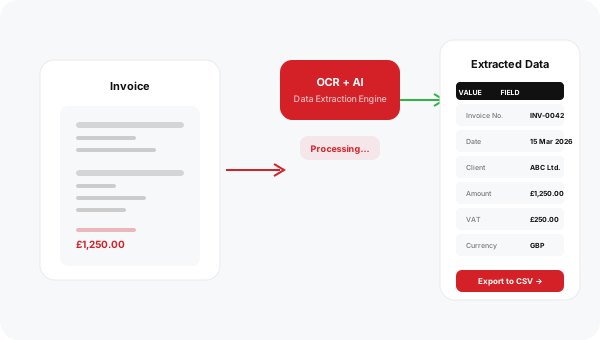
Supports a wide range of document types
DocuExtract can process bank statements, invoices, purchase orders, and many other business documents using OCR and AI.
Extract document data with ease
Combine OCR technology with AI-powered extraction to turn unstructured documents into structured data you can use.
- Extract data from PDFs and image files
- OCR technology
- AI-powered extraction
- Support for multiple document types
- Data displayed in grid view
- Export to CSV
- Push to other solutions via integrations
From document to data in four steps
Upload your documents and let DocuExtract handle the rest — from OCR processing to structured data export.
1. Upload
Upload PDF or image files containing the data you need to extract.
2. Process
OCR and AI analyse the document and extract the relevant data fields.
3. Review
View the extracted data in a clean grid on your screen.
4. Export
Export to CSV or push the data to other solutions via integrations.
Ready to automate your data extraction?
Turn PDFs and images into structured data with AI-powered OCR extraction. Export to CSV or push directly to your other business solutions.